<!-- markdown-config presentation=true -->

<script>
import { openBrowser, openComponent } from "doc/PX2018/project_2/utils.js"

let presentationSize = "small";
</script>
<link rel="stylesheet" type="text/css" href="doc/PX2018/project_2/utils.css">
<link rel="stylesheet" type="text/css" href="doc/PX2018/project_2/presentation.css">

<link rel="stylesheet" type="text/css" href="doc/PX2018/style.css" />
<link rel="stylesheet" type="text/css" href="src/client/lively.css" />
<link rel="stylesheet" type="text/css" href="templates/livelystyle.css" />

<style>
  .lively-slide {
    border: 1px solid rgb(220,220,220)
    page-break-before: always;
  }
  
  p {
    font-size: 18pt
  }
  @media print {
    .lively-slide {
      page-break-before: always;
      border: 0px solid white;
/*       border: 2px solid blue; */
    }      
  }
  
</style>

<script>
let presentation = lively.query(this, "lively-presentation");
let presentButton = document.createElement('button');
presentButton.innerHTML = 'present';
presentButton.addEventListener("click", () => {
  let slides = presentation.querySelectorAll('.lively-slide');
  
  slides.forEach(slide => {
    slide.className += ' fullscreen-' + presentationSize;
  })
  presentButton.style.display = 'none';
  prevButton.style.display = 'none';
  nextButton.style.display = 'none';
})

if (presentation && presentation.slides) {
  presentation.slides().forEach(ea => {
    var img = document.createElement("img")
    img.classList.add("logo")
    img.src="https://lively-kernel.org/lively4/lively4-jens/doc/PX2018/media/hpi_logo.png" 
    img.setAttribute("width", "50px")
    ea.appendChild(img)

    var div = document.createElement("div")
    div.classList.add("page-number")
    ea.appendChild(div)
  });
}

presentButton
</script>

<div class="title-frontpage">
  Programming Experience 2018:<br />- Material Point Method -
</div>

<div class="authors">
  Sebastian Koall
</div>

<div class="credentials">
  Software Architecture Group <br>Hasso Plattner Institute<br> University of Potsdam, Germany
</div>

<script>
  var button = document.createElement("button")
  button.textContent = "print"
  button.onclick = async () => {
   var presentation = lively.query(this, "lively-presentation")
   presentation.print()
  }
  button.style = "position: absolute; bottom: 10px; left: 10px"
  button
</script>


--- 
<div class="title-1">Introduction</div>

<ul class="notes notes-big">
<li>How can materials be simulate</li>
</ul>

---
<div class="title-1">Introduction</div>

<ul class="notes notes-big">
<li>How can materials be simulate<br><i class="fa fa-arrow-right"></i>Material Point Method</li>
</ul>

---
<div class="title-1">Introduction</div>

<ul class="notes notes-big">
<li>How can materials be simulate<br><i class="fa fa-arrow-right"></i>Material Point Method</li>
<li>Why is it of interest?</li>
</ul>

---
<div class="title-1">Introduction</div>

<ul class="notes notes-big">
<li>How can materials be simulate<br><i class="fa fa-arrow-right"></i>Material Point Method</li>
<li>Why is it of interest?</li>
<li>Well take a look:</li>
</ul>
<iframe style="position: absolute; bottom: 50px; right: 50px;" width="50%" height="50%" src="https://www.youtube.com/embed/nXck0xs7oyw?start=150" frameborder="0" allow="autoplay; encrypted-media" allowfullscreen></iframe>

---
<div class="title-1">Related Work</div>

<ul class="notes notes-big">
<li><a href="https://www.researchgate.net/profile/Vinh_Phu_Nguyen/publication/262415477_Material_point_method_basics_and_applications/links/00463537ab99f084f0000000/Material-point-method-basics-and-applications.pdf">Material point method: basics and applications</a></li>
<li><a href="https://www.math.ucla.edu/~jteran/student_thesis/jiang.pdf">The Material Point Method for the<br />Physics-Based Simulation of Solids and Fluids</a></li> 
<li><a href="https://github.com/onsetsu/floom/">Stefan's Javascript implementation</a></li>
</ul>

---
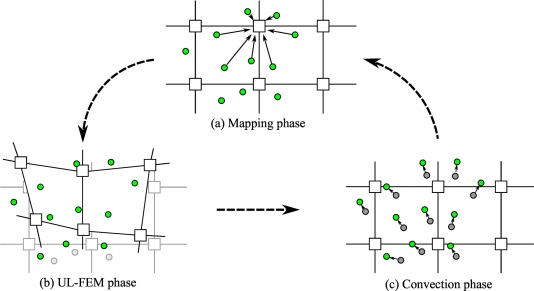
<div class="title-1">Concept</div>

<ul class="notes notes-big">
<li>Is a particle-in-cell method</li>
<li>Particles moving in a grid</li>
<li>Grid points influence the particle movement</li>
</ul>

<img style="position: absolute; bottom: 100px; left: calc(30% + 10px); width: 40%; max-width: 100%;" alt="Hier hätte eine MPM Grafik erscheinen müssen..." src="./mpm-phases.png" />

---
<div class="title-1">Outlook</div>

<ul class="notes notes-big">
<li>Explore the material point method with simple examples</li>
<li>Animations that show the influence of variables</li>
<ul>
<li>To simulate different materials</li>
<li>To simulate different behavior</li>
</ul>
<li>If manageable:<br />Explain how to create material out of particles</li>
</ul>

---

# Close

<script>
let closeButton = document.createElement('button')
closeButton.innerHTML = 'close';
closeButton.addEventListener("click", () => {
  let slides = presentation.querySelectorAll('.lively-slide');
  
  slides.forEach(slide => {
    slide.className = slide.className.replace('fullscreen-' + presentationSize, '');
  })
  
  presentButton.style.display = 'inline';
})
closeButton
</script>