# Programming
Each character type has a **program** that determines which actions they take on their turn.
Modify your characters' programs to lead them to victory in battle.
## Editing Programs
Clicking the code icon () next to a character's name will open an editor on its program:
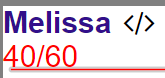
Each program has a default `exec` function:
```javascript
export default function exec() {
// what action to take
}
```
The code in this function determines, what action the character will take on its turn.
As a example, the following code allows the character to attack a random enemy:
```javascript
export default function exec() {
attack(enemies.random())
}
```
When you're done modifying a program, press `Ctrl-S` to save. Characters will always use the newest version of their program.
## Viewing the Field
me
allies
enemies
#### Access Modifications
.has
e.g.
.has('charged')
.get
## Basic Actions
attack
defend