# Project 5: Lively4 Connectors
## Goals:
- Implement a unidirectional dataflow mechanism for properties of graphical objects using active expressions
- Design and implement a graphical user interface to interactively create dataflow and event connections
- Persist created connections into existing PartsBin
- Create a non-trivial example application using connectors
# Documentation
## Abstract
Lively4 Connections are a way to make dataflow between elements more tangible. Graphical elements can be connected via the also graphical Halo. The first element of the connection, the source, has an event or property that will influence a second element, the target. With the connection Halo item, connections can be created quickly, but they can be further modified by opening a connection editor (also accessible via Halo item).
The main idea behind this is based on lively connectors, a connection implementation in a previous lively version.
## Assumptions
Connections are currently a unidirectional flow between two elements. While source and target can be switched, the applied functionality stays the same.
Currently, connections are only editable in the UI via an Halo item and a connection editor widget. The connection itself has no morph etc.
Events and properties can be connected. Connections work for cases that work with the event listener system or active expressions.
## Approach
The approach was to get closer to the old connection functionality over iterations and extend the features created during this process. The first step was to add the Halo item and first (hardcoded) connections that could be added with the Halo item. At the same time the old tools were inspected (lively connectors tested, old videos seen, Fabrik paper read).
Then the connection creation was enhanced (hardcoded -> generated). This then required the creation of the connection editor for a better editing interface. The connection creation and the editor were then further enhanced.
## All Readings:
- Stefan Ramson and Robert Hirschfeld. Active Expressions: Basic Building Blocks for Reactive Programming. 2017
- Jens Lincke. Evolving Tools in a Collaborative Self-supporting Development Environment. Doctoral Dissertation 2014
- Jens Lincke and Hirschfeld. User-evolvable Tools in the Web. FLOSS 2013
- Jens Lincke, Robert Krahn, Dan Ingalls, Marko Röder, and Robert Hirschfeld. The Lively PartsBin – A Cloud-based Repository for Collaborative Development of Active Web Content. HICSS 2012
- Dan IngaIIs, Scott Wallace, Yu-Ying Chow, Frank Ludolph, Ken Doyle. Fabrik A Visual Programming Environment. OOPSLA 88
## (Argument /) Discussion
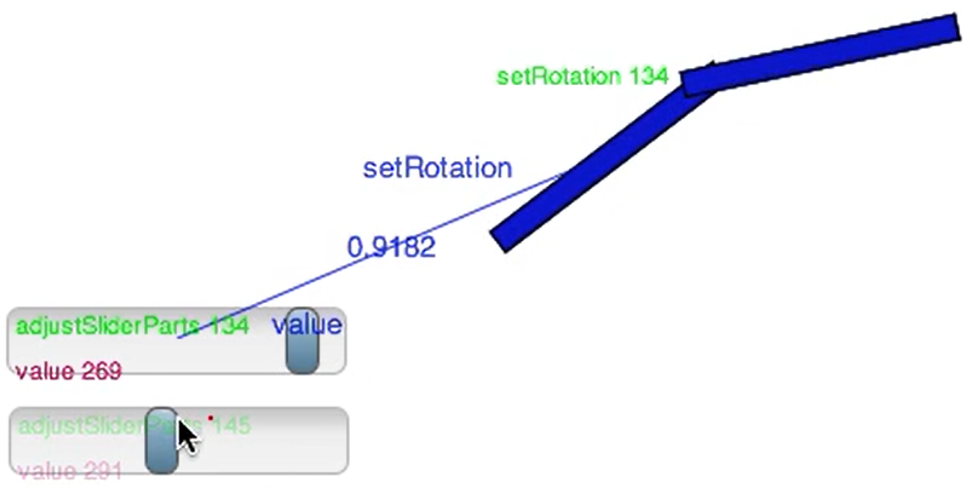
Connection between graphical objects can be created via a Halo item. A Halo on the first item, the source, needs to be opened and then the "plug symbol item" needs to be clicked. Then the user can choose on what property/event of the source the connection is based on. When ever the chosen event is triggered / the property changed, the connection function will be executed. Instead of choosing something to create a new connection, the last two items allow opening editors for existing connections (either a connection that concerns the haloed object or one of all existing connections).
After choosing a source and a basis for the connection, a label of the chosen property/event will be following the cursor and the element currently below the cursor will be highlighted. Clicking on such a highlighted element will make it the second element of the connection, the target. As with the source, a property can then be chosen. This will create a first function that the connection uses; the property of the target will be set to the received value (or a hardcoded number in case of an event).
Opening a connection editor allows changing the connection name, the target, the source, the code that determines the listened on property/event and the executed code. The connection direction can be toggled, which means target and source are switched. The connection can be (de)activated or deleted completely. Hovering the target/source clones in the editor will draw a line to those element in the world. Via button draw an arrow in the direction of the connection between those two elements can be drawn. The connection can also be duplicated.
If the two connected elements are in the world and the browser reloads, the connections will be reinitialized as part of the lively load process. This also allows saving connection into and loading from the partsbin.
An example (also used in the presentations) is e.g. a temperature converter.
## (Austerities /) Limits
Copying elements and their connections should be possible through the use of lively ids, but was not tested extensively.
Connection can currently only be edited through an editor widget and only visualized as temporary drawings; there is no connection morph/widget. If there was a connection widget (e.g. based on lively4 connectors, which are "arrows") it would allow for altering source and target of a connection like other visual programming tools.
Currently, connections are reinitialized after a browser reload, but any open connection editors will loose their set connection.
After initialization, connections are currently named by adding an id / counter (e.g. "Connection 1"). While users can change this name, more expressive initial names could be automatically generated (e.g. "Connection from Value to Width").
In general, events can be used to create connections, but the list of events in the Halo menu is not exhaustive. The other events could be added via a more exhaustive list of events or a new way to determine which events an object supports.
Connections do not handle deletion in all cases. The editor has a button that allows deleting the connection in question. Should one or both elements that the connection connection connects be deleted, the connection will still persist (unless the browser is reloaded). This sometimes causes the connection ids to reset, which leads to inconsistent naming.
At the moment, everything in the world can be connection, including the connection editor or temporary elements; a meta flag or something similar could be used to exclude those elements from accidentally being used as source or target.
## (Access /) Entry points
- [Connection](edit://src/components/halo/Connection.js)
- [Connection Halo Item HTML](edit://src/components/halo/lively-halo-connectors-item.html)
- [Connection Halo Item](edit://src/components/halo/lively-halo-connectors-item.js)
- [Connection Editor HTML](edit://src/components/tools/lively-connection-editor.html)
- [Connection Editor](edit://src/components/tools/lively-connection-editor.js)